Introduction to Computers Class 6 CBSE Hardware Software
Introduction to Computers Class 6 CBSE Hardware Software
The Introduction to Computers Class 6 CBSE Hardware Software is a fundamental concept in Computer Science that forms the basis of understanding how computers work and their applications in our daily lives. In this chapter, we will delve into the core concept of hardware and software, their technical components, and real-world applications. We will also analyze the board exam pattern and provide tips for students to excel in this topic.
Core Concept
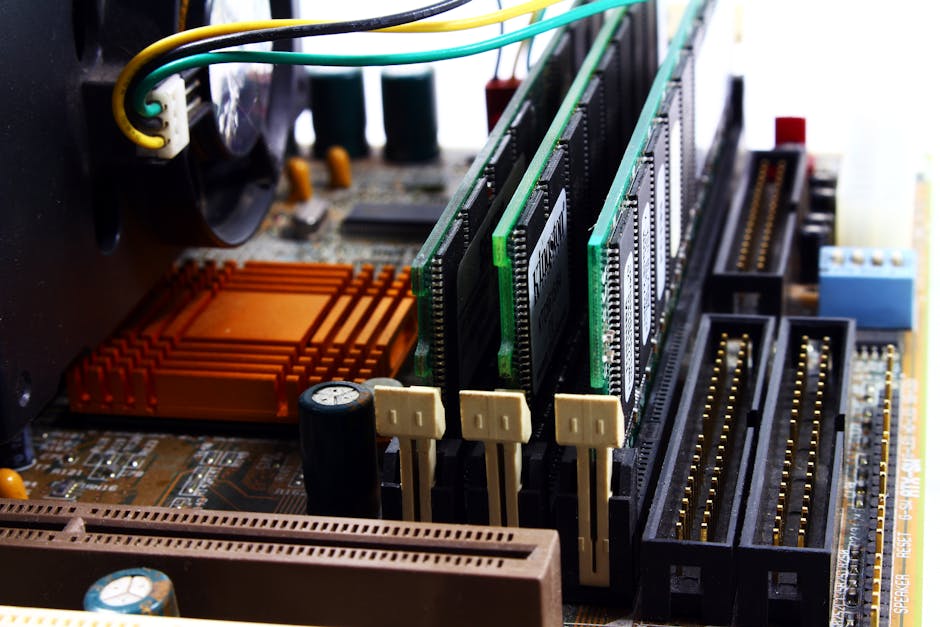
The core concept of Introduction to Computers Class 6 CBSE Hardware Software revolves around understanding the basic components of a computer system. A computer system consists of hardware and software components. Hardware refers to the physical parts of a computer, such as the keyboard, mouse, monitor, and central processing unit (CPU). Software, on the other hand, refers to the set of instructions or programs that tell the computer what to do.
Technical Components
The technical components of a computer system include the hardware and software components. The hardware components include the input devices, output devices, storage devices, and processing devices. The input devices include the keyboard, mouse, and scanner, which allow users to interact with the computer. The output devices include the monitor, printer, and speaker, which display or produce the output of the computer. The storage devices include the hard disk, floppy disk, and CD-ROM, which store data and programs. The processing devices include the CPU, which executes instructions and performs calculations.
Process/Derivation
The process of a computer system involves the interaction between the hardware and software components. The software components, such as the operating system and application programs, provide instructions to the hardware components, which execute the instructions and produce the desired output. The derivation of the output involves the processing of input data, which is stored in the storage devices and retrieved by the CPU for processing.
Real-world Applications
The real-world applications of Introduction to Computers Class 6 CBSE Hardware Software are numerous and diverse. Computers are used in various fields, such as education, healthcare, finance, and entertainment. In education, computers are used to provide interactive and engaging learning experiences for students. In healthcare, computers are used to store and retrieve patient data, diagnose diseases, and provide treatment plans. In finance, computers are used to manage financial transactions, track investments, and provide financial analysis. In entertainment, computers are used to create and play games, watch movies, and listen to music.
Common Misconceptions
There are several common misconceptions about Introduction to Computers Class 6 CBSE Hardware Software. One misconception is that hardware and software are interchangeable terms. However, hardware refers to the physical parts of a computer, while software refers to the set of instructions or programs that tell the computer what to do. Another misconception is that computers are only used for playing games and watching movies. However, computers have numerous real-world applications in various fields, such as education, healthcare, and finance.
Memory Trick (Mnemonic)
A memory trick to remember the basic components of a computer system is the acronym "HIPS". HIPS stands for Hardware, Input, Processing, and Storage. This mnemonic device helps students to remember the key components of a computer system and their functions.

Board Exam Analysis
The board exam pattern for Introduction to Computers Class 6 CBSE Hardware Software includes multiple-choice questions, short-answer questions, and long-answer questions. The multiple-choice questions test students' knowledge of the basic components of a computer system and their functions. The short-answer questions test students' understanding of the technical components of a computer system, such as the input devices, output devices, and storage devices. The long-answer questions test students' ability to analyze and evaluate the real-world applications of computers.
Exam Tips
To excel in the board exam, students should focus on understanding the core concept of hardware and software, their technical components, and real-world applications. Students should also practice solving multiple-choice questions, short-answer questions, and long-answer questions to develop their problem-solving skills and time management skills.
Examples and Case Studies
Here are a few examples and case studies that illustrate the real-world applications of Introduction to Computers Class 6 CBSE Hardware Software:
- A school uses computers to provide interactive and engaging learning experiences for students. The computers are equipped with educational software that provides interactive lessons, quizzes, and games.
- A hospital uses computers to store and retrieve patient data, diagnose diseases, and provide treatment plans. The computers are equipped with medical software that provides accurate and up-to-date information on patient care.
- A bank uses computers to manage financial transactions, track investments, and provide financial analysis. The computers are equipped with financial software that provides real-time information on market trends and investment opportunities.
- A gaming company uses computers to create and play games. The computers are equipped with gaming software that provides interactive and engaging gaming experiences for players.
- A music company uses computers to create and edit music. The computers are equipped with music software that provides a range of tools and effects for music production.
Key Takeaways
The key takeaways from Introduction to Computers Class 6 CBSE Hardware Software are:
- Hardware refers to the physical parts of a computer, while software refers to the set of instructions or programs that tell the computer what to do.
- The technical components of a computer system include the input devices, output devices, storage devices, and processing devices.
- Computers have numerous real-world applications in various fields, such as education, healthcare, finance, and entertainment.
- Students should focus on understanding the core concept of hardware and software, their technical components, and real-world applications to excel in the board exam.
Practice Quiz
1. What is the difference between hardware and software?
Click to Show Answer
2. What are the technical components of a computer system?
Click to Show Answer
3. What are the real-world applications of computers?
Click to Show Answer
4. What is the acronym "HIPS" used for?
Click to Show Answer
5. What is the board exam pattern for Introduction to Computers Class 6 CBSE Hardware Software?
Click to Show Answer
Frequently Asked Questions
Q: What is the difference between a computer and a laptop?A:
A computer and a laptop are both electronic devices that can perform various tasks, but they differ in their design and functionality. A computer is a desktop device that consists of a separate monitor, keyboard, and CPU, while a laptop is a portable device that integrates all these components into a single unit.
Q: What is the importance of software in a computer system?A:
Software is essential in a computer system as it provides the instructions and programs that tell the computer what to do. Without software, a computer would not be able to perform any tasks or functions.
Q: What are the different types of software?A:
There are several types of software, including operating systems, application programs, and utility programs. Operating systems manage the computer's resources and provide a platform for running application programs. Application programs perform specific tasks, such as word processing or spreadsheets. Utility programs perform maintenance tasks, such as disk formatting or virus scanning.
Q: What is the role of hardware in a computer system?A:
Hardware refers to the physical components of a computer system, such as the keyboard, mouse, monitor, and CPU. These components work together to perform tasks and functions, and they are essential for the operation of the computer.
Q: How do computers impact our daily lives?A:
Computers have a significant impact on our daily lives, as they are used in various aspects of our lives, such as education, healthcare, finance, and entertainment. They provide us with access to information, enable us to communicate with others, and facilitate various tasks and activities.
Comments
Post a Comment